
How to Find Your Bitget UID and Link It to TradeBoost
Table of contents
Can't find your Bitget UID after signing up? A form wants an account number, and you're staring at an email address and a deposit address. Which one goes in?
Use the UID shown in your Bitget profile. Copy that account identifier, select Bitget in TradeBoost and check the connection result after you submit it.
Checked November 10, 2026. The account-location instructions follow Bitget's official UID guide. Menu positions can change with app versions and language settings.
The quick answer ✅ Find the UID in your Bitget profile, copy it and use it in the TradeBoost linking flow. Submitting a number and having a verified connection are separate steps.
Don't have a Bitget account yet? Use the TradeBoost Bitget partner route to review the operator-confirmed 20% lifetime discount on eligible Spot and Futures trading fees. Check the terms shown during registration. Entering an existing UID doesn't change the account's original referral relationship.
What exactly is a Bitget UID? ✍️
A UID is an account identifier. Think of it as a customer number on a support ticket. It tells the service which account you're talking about.
It isn't a place to send crypto. It isn't your login email. It also isn't a password that lets someone sign in.
| Information | Its job | Goes in the UID field? |
|---|---|---|
| Bitget UID | Identifies the exchange account | Yes |
| Email or phone number | Login and verification | No |
| Crypto deposit address | Receives an asset on a network | No |
| Password or one-time code | Protects access to your account | Never |
Bitget says its UID is generated for the account and can't be changed. You don't need to create one yourself. If a form doesn't accept it, changing random digits won't fix the underlying problem.
Treat the number as account information even though it isn't a login secret. There's no reason to post it in a public comment with your email and a screenshot of your balance.
Where do you find it in the app or on the website? 🔎
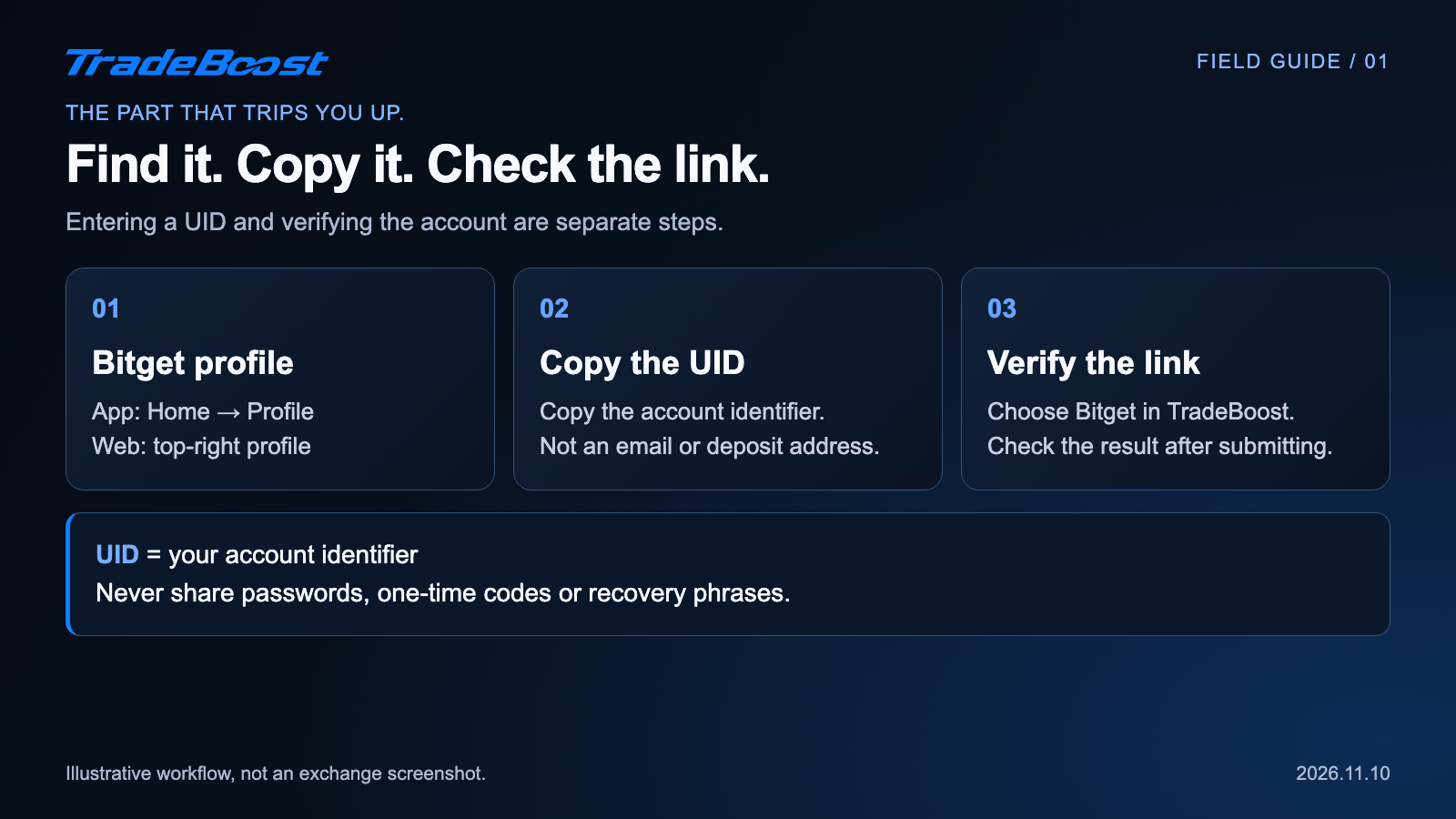
In the app, sign in, open the profile icon at the top left of Home, then open Profile and copy the UID.
On the website, sign in and hover over the profile icon at the top right. Copy the displayed UID. Bitget's Dashboard offers another route.
Those are the paths in Bitget's help article. Use the current labels on your screen if the layout looks different.
Copying beats retyping. It's easy to skip a digit when you're switching between a phone and a laptop. After you paste, check that you haven't carried over a label, colon or extra space.
Also make sure both devices are using the account you mean to link. If you created accounts with different login methods, don't assume the profile open on your phone matches the browser session.
How do you use it in TradeBoost? 🔄
Open TradeBoost and sign in. Continue to exchange setup, choose Bitget, and follow the instructions for whether you already have an account.
When you reach the UID step, paste the copied number. Check it against your profile, then submit it and read the result.
The current TradeBoost flow checks the exchange and account identifier. A number that looks valid isn't, by itself, proof of a verified referral connection.
Finish by checking the connection status. Don't stop at a filled-out field or a loading message. If the screen reports an error, treat it as an unresolved connection.
You don't need to place a trade just to locate your UID. If you're still creating the exchange account, use our separate Bitget signup and verification guide. Keep that job separate from checking the account link.
What if the number is right but linking fails?
First identify the kind of failure. Repeated submissions don't help if the selected exchange is wrong or the account is already linked elsewhere.
| What you're seeing | Check this first | Useful next step |
|---|---|---|
| Invalid format | Extra text or spaces | Copy the UID again from your profile |
| UID couldn't be verified | Account, exchange and referral route | Confirm that you're linking the intended Bitget account |
| UID is already linked | A different TradeBoost login | Check the account you used previously |
| Temporary connection failure | Network or service response | Keep the error message and try after the interruption |
The useful distinction is identity versus eligibility. A UID can identify a real account without establishing that the account belongs to the required referral route.
If you signed up through a different route, check the account-specific instructions before changing anything. Pasting a UID doesn't rewrite signup history. Account deletion or a new account shouldn't be your first troubleshooting step.
For a support request, save the exact error wording and the time it happened. Send account details only through the intended private support channel. Leave passwords, verification codes and recovery phrases out of the conversation.
Does linking mean cashback has already arrived?
No. A verified account connection and a credited balance answer different questions.
The connection tells you which account is linked. Your benefit and settlement records tell you what has actually been applied or credited. Keep those checks separate so you don't mistake a successful setup screen for a payment receipt.
For example, imagine you finish linking today but you're reviewing an older statement. The successful connection alone doesn't prove that the earlier activity qualified. You need the applicable account terms and the actual record.
You also shouldn't trade more just to make a number appear. Setup is an account task, not a reason to change your trading volume.
What should you check before calling it done? 🎯
Use this short handoff checklist:
- The selected exchange says Bitget.
- The linked identifier matches the UID in your own profile.
- The screen confirms completion rather than an error or unfinished step.
- You know where to check the account's actual benefit and settlement records.
That last check saves a second round of confusion. "I entered my UID" is a useful starting point for support. "The account is verified, and this is the record I'm checking" is much more precise.
If you're helping a friend, send the workflow image. They can follow the steps without sharing their account number with you.
Got the right UID? You can finish the account check on TradeBoost without guessing which identifier belongs in the field.
This article is for informational purposes only, not financial advice. TradeBoost may receive compensation through its partner links. Exchange access and benefits depend on your location, account and applicable terms.
What TradeBoost is
TradeBoost is a third-party affiliate-rebate service that returns a portion of exchange affiliate commissions to users as USDT on Arbitrum One. TradeBoost is not an exchange, broker, custodian, or investment service, and does not provide trading, custody, or financial advice.
General disclaimer
This article is for informational purposes only. All trading occurs on third-party exchanges under their terms. Trading and investment decisions should be made based on your own judgment and risk tolerance.
Related articles
 exchange-guides
Bitget Sign Up 2026: 20% Lifetime Trading Fee Discount
Use TradeBoost's Bitget partner link for a 20% lifetime discount on eligible Spot and Futures fees. Follow signup, KYC and account-linking steps.
 exchange-guides
Bitget’s Two 20% Fee Discounts: Which One Applies?
Bitget’s BGB spot fee discount and TradeBoost’s 20% referral offer cover different trades. See who qualifies and what to check before signup.
 exchange-guides
OKX Sign Up 2026: TradeBoost Referral & Fee Benefits
Sign up for OKX through TradeBoost's referral link. Check account-specific fee benefits, complete KYC and connect your UID for eligible cashback.