
OKX Sign Up 2026: TradeBoost Referral & Fee Benefits
Table of contents
Signing up for OKX through TradeBoost? Start with its referral link and the fee benefits shown for your account. This guide walks you through registration, KYC and UID linking, then explains how to check eligible cashback separately from exchange fees.
Already have a OKX account? Use the account setup and troubleshooting guide for KYC, security and deposit checks. You do not need another account to follow those checks.
Checked November 5, 2026. We checked OKX's official registration guide, identity verification instructions and UID guide. Your local service entity determines product availability.
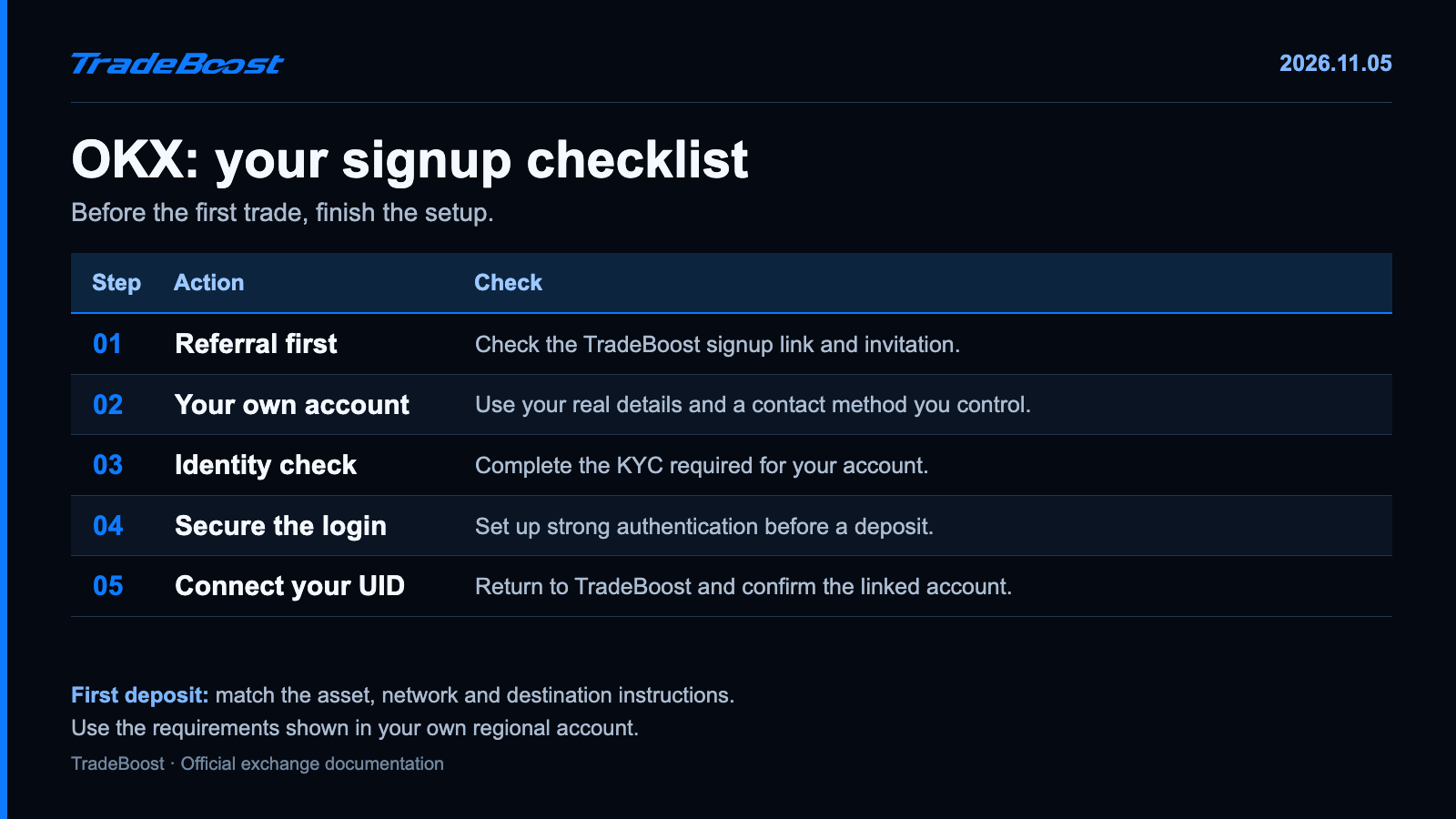
The quick answer: open the TradeBoost partner link, register with your own details, finish the required KYC, secure the account and copy your UID. Check the deposit network before transferring crypto.
Start with the TradeBoost route: Create your OKX account through TradeBoost. Check the referral information and the offer displayed to your account. After registration, return to TradeBoost to connect OKX.
Is an OKX exchange account the same as a wallet?
No. An exchange account is the account you log into for the exchange's supported services. A self-custody wallet gives you control of its own recovery credentials. The two can appear inside the same broader product experience, which is where beginners get confused.
For this guide, you need the exchange account and its UID, the unique account identifier. A wallet's recovery phrase isn't a substitute for that ID, and you shouldn't share one to link TradeBoost.
Think of a UID as a customer number on an account statement. It identifies the account; it doesn't authorize someone to spend its balance. Passwords and recovery credentials are a different category.
| Item | What it's for | Use it for the TradeBoost account-ID field? |
|---|---|---|
| OKX UID | Identifying your exchange account | Yes, follow the linking flow |
| Deposit address | Receiving a specific asset on a network | No |
| Login password or one-time code | Signing in or approving actions | No |
| Wallet recovery phrase | Recovering control of a self-custody wallet | No |
How do you register through TradeBoost?
- Open TradeBoost's OKX signup link.
- Check that the destination is an official OKX page and review the referral information shown.
- Choose the registration method available for your country. Use an email or phone number you control for the long term.
- Complete the verification and password prompts. Enter your actual country and personal details.
- Check the account's next steps for verification and security.
Don't select a different country just to reveal a product or offer. If the signup page redirects to a regional entity, read its terms. The services and referral benefits shown there take priority over a generic global guide.
The official registration FAQ also covers reused email addresses, mobile-number formats and account types. If you already have an account, try the recovery path rather than treating an error as a reason to create another identity.
What do you need for OKX identity verification?
KYC means Know Your Customer, the identity checks required for the account's services. Open your account's verification area and follow the individual-account process.
OKX asks for personal information, an accepted identity document and a selfie. Extra checks, including address evidence, can depend on your region or circumstances. The official verification guide lists the current requirements.
Before submitting, check the small details: full name, date of birth, document validity and the country associated with the document. A nickname that works fine in a chat app doesn't belong in a legal-name field.
Use clear photos with the whole document visible. Give the face check good lighting. If you're asked for a document you don't have, use the account's official support flow. Don't ask someone else to verify the account on your behalf.
Where can you find your OKX UID?
On the app, open the user center and profile/account settings. On the web, open your profile and personal information. Copy the UID from the account rather than typing a long number from memory. OKX's UID instructions show both routes.
Then open TradeBoost, choose OKX and follow the exchange-linking instructions. Check the confirmed account details before you save them.
If you have several exchange tabs open, pause long enough to compare the exchange name. A Binance or Bybit UID won't become an OKX UID because it fits in the same box.
What should you check before the first deposit?
Finish the strong authentication options offered by your account first. Store recovery information privately. Don't share a login code with anyone claiming they need it to release a referral reward. 🛡️
For the deposit itself, choose the receiving asset and network in OKX. Compare them with the sending platform, along with the address, minimum deposit and any memo or tag requirement.
For example, seeing USDT on both sides isn't enough. The selected networks must also match. A test transfer needs to clear the receiving minimum; an amount below the minimum isn't a useful test.
Avoid treating a guide's old screenshot as the current deposit screen. Network support, fees and maintenance status change. Use the live receiving instructions for the transfer you're making.
How do you compare OKX fees and referral benefits?
Check your account's fee page for the product you plan to use. A Spot maker rate and a Futures taker rate describe different things. Comparing them directly tells you very little about your actual cost.
A simple example: if an execution is worth $1,000 and the applicable fee is 0.10%, the charge is $1. Another $1,000 execution at the same rate adds another $1. Trading in and out counts as two executions.
Our Binance, Bybit, OKX and Bitget fee table keeps the product and maker/taker columns separate. It shows standard rates before individual referral discounts.
TradeBoost's 2026 new-member campaign advertises a 90% distribution of eligible affiliate commission for qualifying signups by December 31, 2026. This uses the commission reported to TradeBoost, not the entire fee you paid. Your linked-account rate and terms decide the cashback amount.
Finish the account route: sign up for OKX through TradeBoost, then join TradeBoost and link your OKX UID. Check the connection before your first trade. 🔄
FAQ
Do I need an OKX wallet to register an exchange account?
No. This guide covers an OKX exchange account. Follow the exchange registration flow and use its UID for the TradeBoost connection.
Where do I find my OKX UID?
Find it in the app's user center/profile settings or the web profile's personal-information area. Use the copy option to avoid typing mistakes.
Can I use someone else's identity document?
No. Register and verify with your own identity and accurate information. If your document isn't accepted, follow the official support options for your account.
Does the TradeBoost link guarantee a fixed welcome bonus?
No fixed welcome-bonus amount is promised here. Check the referral terms and tasks displayed during registration and in your account. TradeBoost cashback has its own linked-account conditions.
Sources and last check
- OKX: account registration.
- OKX: individual identity verification.
- OKX: finding a UID.
- OKX: trading fee rules.
- TradeBoost partner URL and campaign: current product configuration and operator instructions, checked November 5, 2026.
This article contains TradeBoost affiliate links. Eligible activity may generate commission for TradeBoost. Country, account and campaign conditions apply. This is educational information, not investment advice. Crypto trading can result in losses.
What TradeBoost is
TradeBoost is a third-party affiliate-rebate service that returns a portion of exchange affiliate commissions to users as USDT on Arbitrum One. TradeBoost is not an exchange, broker, custodian, or investment service, and does not provide trading, custody, or financial advice.
General disclaimer
This article is for informational purposes only. All trading occurs on third-party exchanges under their terms. Trading and investment decisions should be made based on your own judgment and risk tolerance.
Related articles
 exchange-guides
Binance Sign Up 2026: JOINTB Spot 20% / Futures 10% Off
Sign up with Binance referral code JOINTB: 20% off eligible Spot fees and 10% off eligible Futures fees. Includes KYC and TradeBoost linking steps.
 exchange-guides
Bitget Sign Up 2026: 20% Lifetime Trading Fee Discount
Use TradeBoost's Bitget partner link for a 20% lifetime discount on eligible Spot and Futures fees. Follow signup, KYC and account-linking steps.
 exchange-guides
Bybit Sign Up 2026: TradeBoost Referral & Cashback
Join Bybit through TradeBoost's partner link. Check referral and cashback eligibility before signup, then complete KYC and link your account.