
Bitget Sign Up 2026: 20% Lifetime Trading Fee Discount
Table of contents
Signing up for Bitget? TradeBoost's operator-confirmed offer is a 20% lifetime discount on eligible Spot and Futures trading fees through its partner link. Here's how you check the referral, create the account and connect it to TradeBoost.
Already have a Bitget account? Use the account setup and troubleshooting guide for KYC, security and deposit checks. You do not need another account to follow those checks.
Checked November 5, 2026. Registration and KYC steps were checked against Bitget's official app registration guide and website verification guide. Availability and supported documents depend on your country.
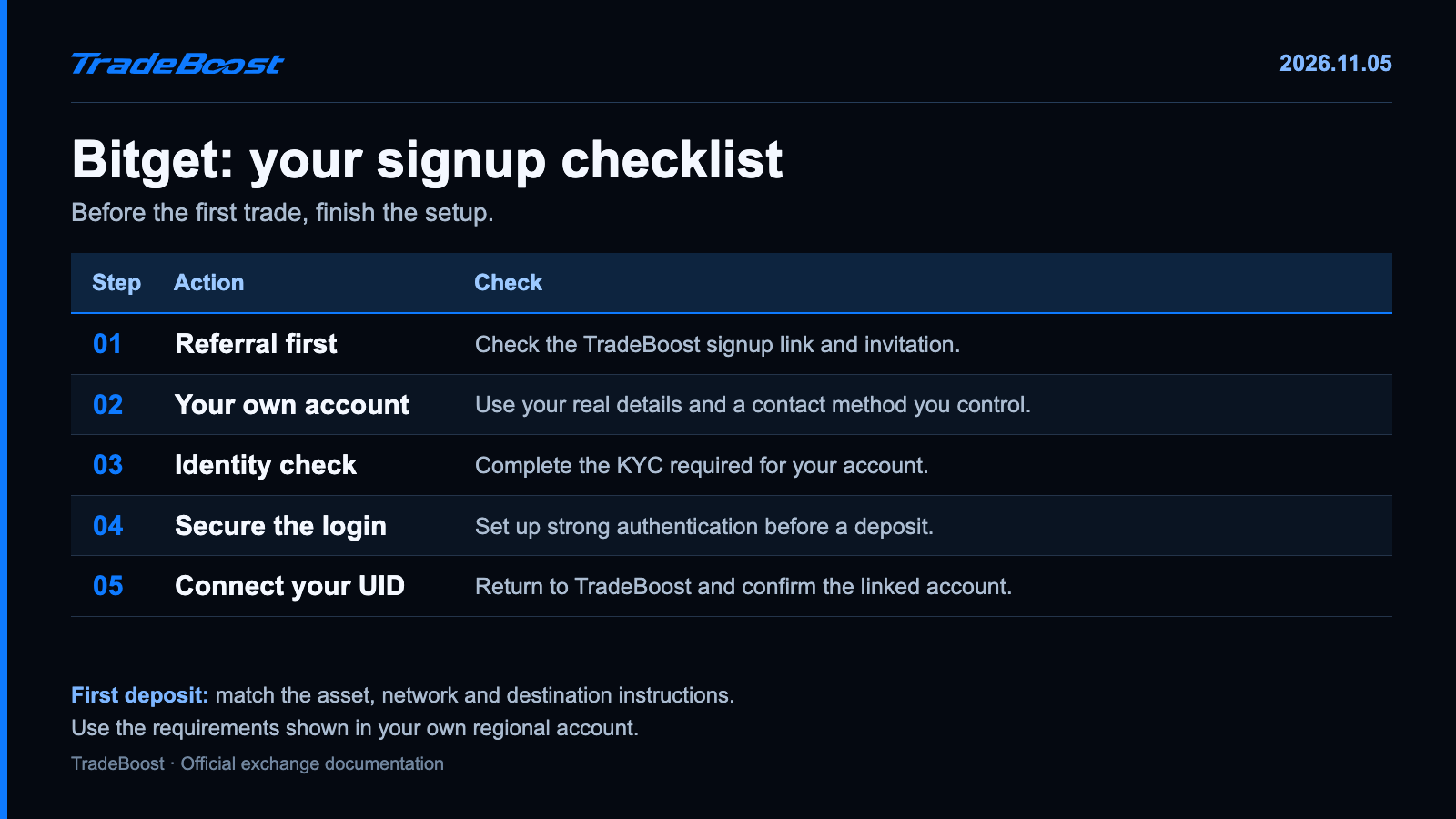
The quick answer: use the TradeBoost partner page, confirm the referral, register, complete identity verification and secure the account. Check your first deposit separately, then connect your UID to TradeBoost.
TradeBoost signup benefit: Open the Bitget TradeBoost partner link. The operator-confirmed offer is a 20% lifetime discount on eligible Spot and Futures trading fees through this referral route. Confirm the benefit shown on your signup page before completing registration.
Which link should you use?
Use https://partner.bitget.com/bg/tradeboost. The partner route is the one TradeBoost provided for these articles. Check that the destination remains an official Bitget domain and that the signup page identifies the referral as expected.
Keep the registration flow together. Opening a different invitation link on another tab makes it harder to tell which route you're completing. If you move into the app, check the referral there before finishing the account.
You can save the confirmation privately. Don't send account passwords, login codes or identity documents to someone claiming they need them to add a referral benefit.
| Check before submitting | What you're looking for |
|---|---|
| Partner route | The TradeBoost Bitget page |
| Referral information | The expected TradeBoost invitation and displayed terms |
| Email or mobile | A method you own and can keep using |
| Residence | Your real country and the appropriate service entity |
| Account details | Your own information, ready for later identity verification |
How do you register a Bitget account?
- Start from the TradeBoost Bitget signup page.
- Choose an email or mobile registration method offered in your region.
- Enter your details and complete the verification-code prompts.
- Use a unique password. Check the referral information before submitting the signup.
- Open the account and continue to identity verification and security settings.
Bitget's registration instructions distinguish account creation from later verification. You shouldn't mistake a successful login for a fully checked account.
Already registered? Use the existing-account route offered by TradeBoost and Bitget instead of creating duplicate identities. Eligibility belongs to the actual account. It isn't something a generic blog guide can switch on.
How do you complete Bitget KYC?
KYC is the check that matches your identity documents to your account. Open the profile's Identity Verification area and select individual verification.
You'll be asked for the relevant country, document type and personal details. Photograph the requested ID, complete the face-check prompts and submit it for review. Bitget's official website guide shows the sequence and explains how to check the result.
Make the name consistent across the form and document. If your passport has a middle name, don't decide to leave it out because the signup screen looks shorter. Use the instructions for the actual field.
If the document photo has glare, move the light rather than editing the image. If it's cut off, take another photo with the full document visible. Keep the camera clear and let the account's review status tell you the next step.
What should you secure before transferring funds?
Set up the strong authentication methods your Bitget account offers. Review recovery options, and store backup information privately. 🛡️
The simple rule is to separate your identifiers from your secrets. An exchange UID identifies the account. A password, one-time code or recovery secret controls access. Treat them differently.
For TradeBoost, copy the Bitget UID from your own profile. Don't paste a wallet address into the account-ID field. Don't send an authenticator secret or an API key with withdrawal permission to activate a referral.
How do you avoid a first-deposit mistake?
Open the receiving account and select the asset plus the network. Then compare those details with the sending platform before confirming the withdrawal.
USDT isn't one universal deposit route. The asset can exist on different networks. Matching only the ticker is like choosing the correct recipient name but using the wrong delivery address.
| Deposit check | Before you confirm |
|---|---|
| Asset | The same supported token at both ends |
| Network | The exact same network, not merely a similar name |
| Address | Copied from the current receiving screen |
| Extra details | Memo or tag if the destination requires one |
| Minimum and fee | A transfer that clears the deposit minimum after sending costs |
A small test can help you check the route. Keep it above the receiving minimum and wait for credit before making a larger transfer. Check the live deposit status too; support for a network can be paused.
What does the 20% discount mean in practice?
It's a reduction of an eligible trading fee, not a refund of 20% of your trade amount. Use your own account's displayed rate to calculate the result.
For a simple illustration, assume an eligible fee would have been $5. A 20% reduction lowers it by $1, leaving $4. If the account already shows a reduced rate, don't subtract the same discount again.
Discounts and cashback also need separate lines in your notes. Bitget's referral offer concerns trading fees. TradeBoost's cashback depends on eligible affiliate commission and the rate confirmed for your linked account. A fee table should tell you which layer it is showing.
Our 2026 four-exchange fee comparison shows standard rates before account-specific referral benefits. It also explains why funding, withdrawal fees and a copy trader's profit share shouldn't be mixed into a maker/taker comparison.
How do you finish the TradeBoost connection?
After registration and the required verification, return to TradeBoost. Choose Bitget and follow the UID-linking instructions. Check that the account is recognized and that your eligibility and rate are displayed.
The 2026 new-member offer runs through December 31, 2026 and advertises a 90% distribution of eligible affiliate commission. It doesn't mean 90% of all exchange fees. Your confirmed account terms determine the actual cashback.
Get the route in place before trading: join Bitget through the TradeBoost partner page, then join TradeBoost and connect Bitget. Keep the referral confirmation and UID check together. 🔄
FAQ
What is the TradeBoost Bitget signup link?
It's https://partner.bitget.com/bg/tradeboost. Start there and check the referral information in the signup flow you actually complete.
Is the 20% benefit for Spot or Futures?
The TradeBoost operator-confirmed offer covers eligible Spot and Futures trading fees. Check the displayed registration terms and your account's fee page for application to your account.
Does a Bitget login mean KYC is complete?
No. Creating the account and completing identity verification are separate steps. Review the verification status in your account before using restricted features.
Do I need to trade more to use TradeBoost?
No. Finish the referral and account-linking checks first. Don't increase your trading activity just to earn cashback; trading fees and market losses can exceed rewards.
Sources and last check
- Bitget: account registration.
- Bitget: website KYC guide.
- Bitget: fee breakdown.
- TradeBoost referral URL, 20% referral offer and 2026 campaign: operator-confirmed instructions, checked November 5, 2026.
This article contains TradeBoost affiliate links. Eligible activity may generate commission for TradeBoost. Local availability, referral eligibility and account terms apply. This is educational information, not investment advice. Crypto trading can result in losses.
What TradeBoost is
TradeBoost is a third-party affiliate-rebate service that returns a portion of exchange affiliate commissions to users as USDT on Arbitrum One. TradeBoost is not an exchange, broker, custodian, or investment service, and does not provide trading, custody, or financial advice.
General disclaimer
This article is for informational purposes only. All trading occurs on third-party exchanges under their terms. Trading and investment decisions should be made based on your own judgment and risk tolerance.
Related articles
 exchange-guides
Binance Sign Up 2026: JOINTB Spot 20% / Futures 10% Off
Sign up with Binance referral code JOINTB: 20% off eligible Spot fees and 10% off eligible Futures fees. Includes KYC and TradeBoost linking steps.
 exchange-guides
OKX Sign Up 2026: TradeBoost Referral & Fee Benefits
Sign up for OKX through TradeBoost's referral link. Check account-specific fee benefits, complete KYC and connect your UID for eligible cashback.
 exchange-guides
Bybit Sign Up 2026: TradeBoost Referral & Cashback
Join Bybit through TradeBoost's partner link. Check referral and cashback eligibility before signup, then complete KYC and link your account.