
Binance Sign Up 2026: JOINTB Spot 20% / Futures 10% Off
Table of contents
Signing up for Binance? TradeBoost's JOINTB referral offer gives you 20% off eligible Spot fees and 10% off eligible Futures fees. Here's how to check the referral, finish KYC and link your account.
Already have a Binance account? Use the account setup and troubleshooting guide for KYC, security and deposit checks. You do not need another account to follow those checks.
Checked November 5, 2026. This guide uses Binance's official app registration instructions and identity verification guide. Screens and available products can differ by country.
Check service availability before depositing. Following its security incident, Binance announced phased withdrawal reopening for more assets on November 5. Not every asset and network reopens at once. Check the official status for your asset before signing up or transferring funds.
The quick answer: open the TradeBoost link, check JOINTB, create your account, complete KYC, secure your login and check the deposit network. Then return to TradeBoost to connect your Binance UID.
Your signup route: Create a Binance account with TradeBoost code JOINTB. TradeBoost's advertised referral benefit is 20% on eligible Spot fees and 10% on eligible Futures fees. Check the benefit shown on your registration page before you finish. These are separate product rates, not a combined 30% discount.
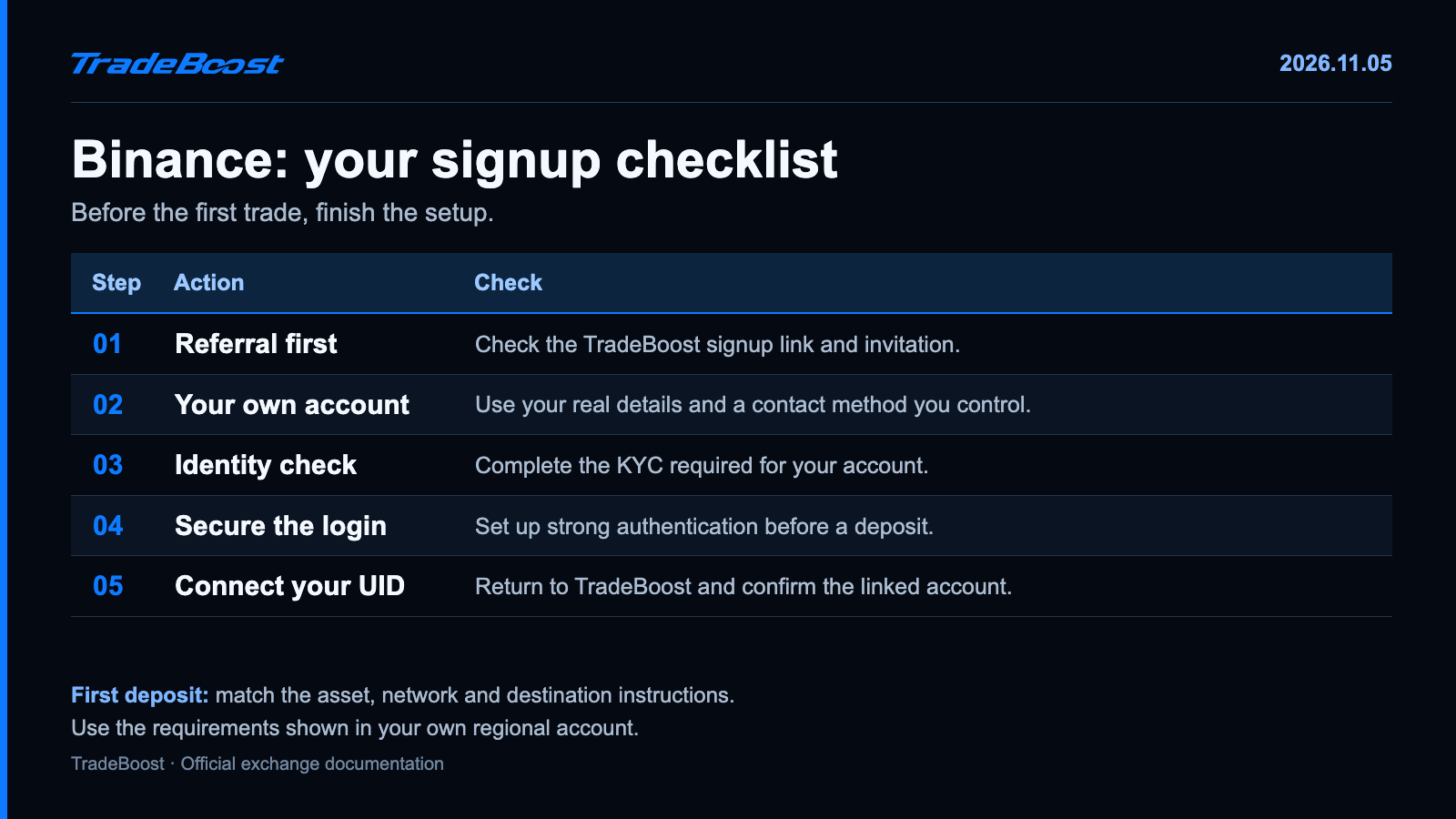
What should you have ready?
You don't need to choose your first trade yet. You need an email address you control, a unique password, your own accepted identity document and a phone with a working camera.
Use the country and account type that actually apply to you. If Binance displays an eligibility restriction, read that before continuing. A global signup guide can't tell you which products your local entity will offer.
Think of the setup as a boarding pass and a passport check. Creating the login gets you into the account. Identity verification decides which services you're allowed to use.
| Prepare | Why it matters |
|---|---|
| An email address you can keep | You'll use it for verification and account recovery |
| Your own valid ID | Your account details need to match the document |
| A phone camera and good lighting | You'll be asked to photograph documents or complete a face check |
| A password manager | It helps you avoid reusing another account's password |
| The JOINTB signup link | It keeps the referral route clear from the start |
How do you sign up with JOINTB?
- Open the TradeBoost Binance registration link. Confirm that you're on a Binance domain.
- Choose a registration method offered to you. Binance supports email, phone and available Apple or Google routes.
- Complete the verification code and password prompts shown in your flow.
- Check the referral section. JOINTB should be the code associated with this signup route.
- Check the linked confirmation before moving on to identity verification. Binance's app guide describes a linked status beside a valid referral.
Keep a private record of the referral confirmation and benefit screen. You won't need to put it on social media or send anyone your verification codes.
Don't assume opening a link once is the same as completing registration through it. Switching devices, changing browsers or opening another promotional link makes the journey harder to audit. Finish the flow in one place where possible.
Already have an account? Don't create a second identity just to force a new-user offer. Read our guide to adding a Binance referral after signup and follow the options actually offered to your existing account.
What happens during Binance KYC?
KYC means Know Your Customer, the identity check that matches a person to an account. In Binance's current guide, new users need the required verified status to access services including deposits and trading.
Open the account's verification area. Select the correct residence, document issuing country and supported document type. Follow the document and live face-check prompts, then review your details before submitting. Use the official KYC instructions for the screen sequence on your device.
For a smoother attempt, put the document on a plain surface and move away from window glare. Keep its edges visible. Use the same name order shown on your document rather than a nickname you've used in other apps.
If the application is pending, check the status rather than starting multiple accounts. If it's rejected, fix the reason given in the account. A new photo may solve glare. It won't solve a mismatch between your name and the document.
Which security checks come before a deposit?
Give account security its own minute. Don't treat it as an optional task for later. 🛡️
- Set up the strong authentication options available in your account, such as an authenticator or passkey.
- Keep recovery material somewhere private and separate from the phone you use to log in.
- Review the devices and sessions you recognize.
- Use the official app and bookmarked website when you need account support.
- Never share a login code, password or authenticator recovery secret with someone offering to activate a discount.
Your exchange UID is an account identifier. It isn't a login credential, a wallet address or a seed phrase. When you connect Binance to TradeBoost, copy the UID from your account instead of guessing from an email or deposit address.
How do you check the first deposit?
Choose the asset and network on the receiving side first. The sending platform must support the same asset on the same network. If the destination requires extra information, such as a memo or tag, include it.
USDT is a useful example: the ticker alone doesn't specify a network. Treat the network like the street address and the asset like the parcel. Having the right parcel doesn't fix sending it to the wrong street.
Before confirming a transfer, compare the address, network, minimum deposit and sending fee shown on both platforms. If you use a small test transfer, make it larger than the receiving platform's minimum. Wait for it to be credited before sending more.
Don't choose leverage or start a position just to see whether the account works. You can finish the setup checks without placing a trade.
What should you check about fees and TradeBoost?
Check your actual Binance fee tier and product before the first order. A Spot fee and a Futures fee apply to different products. Entry and exit can also be separate chargeable executions.
For an illustration, a $2,000 execution at a hypothetical 0.10% rate costs $2. A 20% reduction of that fee would save $0.40, not $400. That's why the percentage's base matters.
See the four-exchange fee table for standard rate comparisons, and how to check a Binance referral for the referral checks.
TradeBoost's 2026 new-member campaign advertises a 90% cashback distribution rate for eligible exchange affiliate commission, for qualifying members who join by December 31, 2026. That's a share of eligible commission reported to TradeBoost, not a promise to refund 90% of the whole trading fee. Your linked-account terms and confirmed rate determine the amount.
Finish the loop: create your Binance account with JOINTB, then join TradeBoost and connect your UID. You can check referral eligibility and the cashback setup before your first trade. 🔄
FAQ
Does signing up mean my Binance account is verified?
No. Registration creates the login. KYC is a separate identity-verification step. Check your verification status in the account before trying to use a product.
Where should I enter JOINTB?
Use the TradeBoost registration link and check the referral field in the flow shown to you. Verify the linked confirmation rather than assuming the code was applied.
Is a Binance UID the same as a deposit address?
No. Your UID identifies your exchange account. A deposit address receives an asset on a specified blockchain network. Use the UID when TradeBoost asks for your exchange account ID.
Is the 90% TradeBoost campaign the same as the Binance discount?
No. The advertised Binance referral discount and TradeBoost's share of eligible affiliate commission use different calculation bases. Read the linked-account terms for your rate and eligibility.
Sources and last check
- Binance: app registration.
- Binance: personal account identity verification.
- Binance: referral program overview.
- Referral URLs and campaign terms: TradeBoost operator instructions and current product configuration, checked November 5, 2026.
This article contains TradeBoost affiliate links. TradeBoost may receive commission from eligible activity. Regional availability, account verification and offer terms apply. This is educational information, not investment advice. Crypto trading can result in losses.
What TradeBoost is
TradeBoost is a third-party affiliate-rebate service that returns a portion of exchange affiliate commissions to users as USDT on Arbitrum One. TradeBoost is not an exchange, broker, custodian, or investment service, and does not provide trading, custody, or financial advice.
General disclaimer
This article is for informational purposes only. All trading occurs on third-party exchanges under their terms. Trading and investment decisions should be made based on your own judgment and risk tolerance.
Related articles
 exchange-guides
OKX Sign Up 2026: TradeBoost Referral & Fee Benefits
Sign up for OKX through TradeBoost's referral link. Check account-specific fee benefits, complete KYC and connect your UID for eligible cashback.
 exchange-guides
Bitget Sign Up 2026: 20% Lifetime Trading Fee Discount
Use TradeBoost's Bitget partner link for a 20% lifetime discount on eligible Spot and Futures fees. Follow signup, KYC and account-linking steps.
 exchange-guides
Bybit Sign Up 2026: TradeBoost Referral & Cashback
Join Bybit through TradeBoost's partner link. Check referral and cashback eligibility before signup, then complete KYC and link your account.