
Bybit Sign Up 2026: TradeBoost Referral & Cashback
Table of contents
Signing up for Bybit? Check TradeBoost's referral link and cashback eligibility before creating your account. Bybit's official registration guide says you can't add, change or remove the referral code afterward. Here's how you finish signup, KYC and account linking in order.
Already have a Bybit account? Use the account setup and troubleshooting guide for KYC, security and deposit checks. You do not need another account to follow those checks.
Checked November 5, 2026. We used Bybit's official registration guide, KYC instructions and KYC FAQ. Products and requirements vary by jurisdiction.
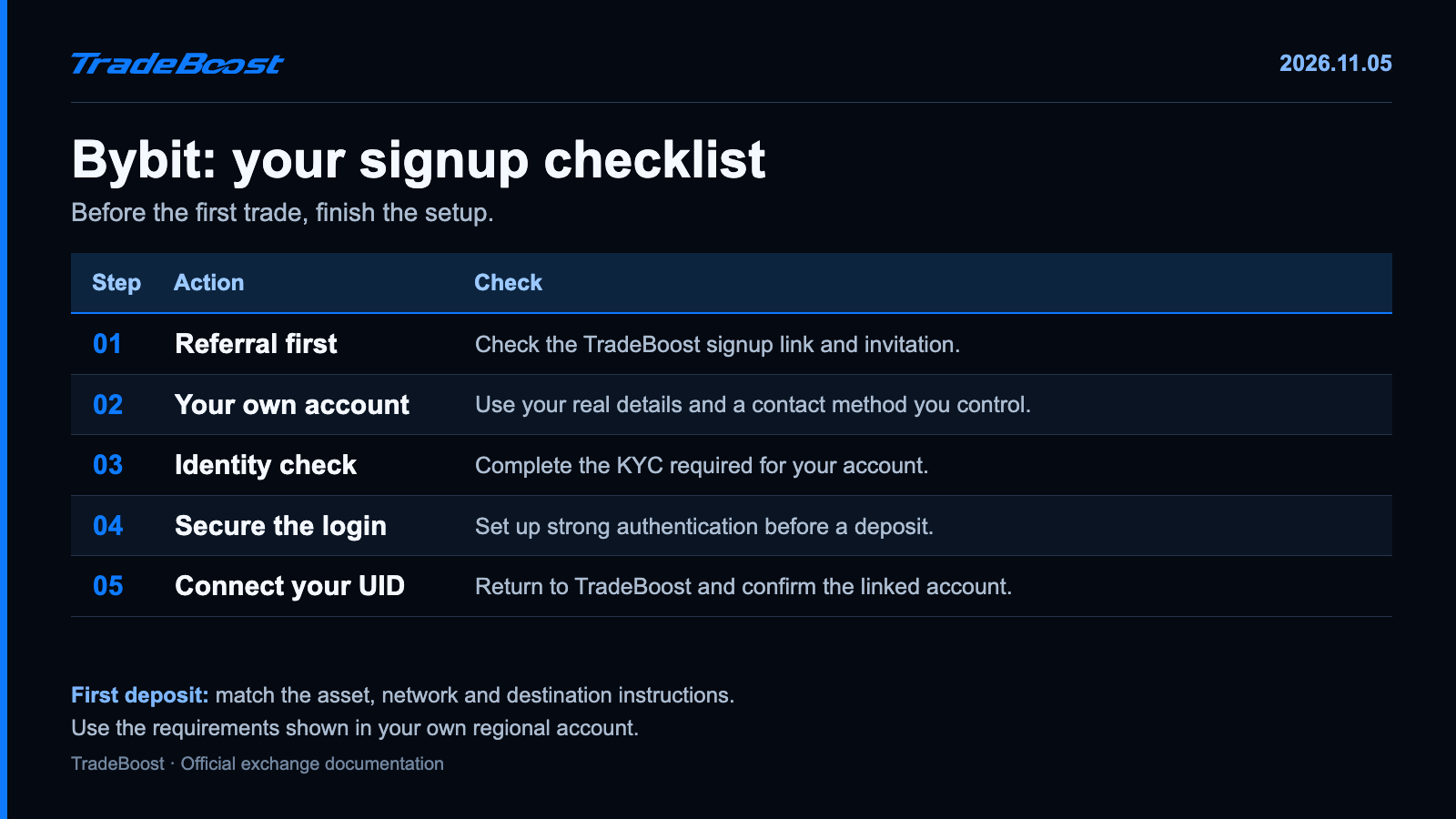
The quick answer: open the TradeBoost partner link, confirm the invitation, create the account and finish Standard KYC. Secure the login before your first deposit, then connect your Bybit UID to TradeBoost.
Choose the referral before the account: Create your Bybit account through TradeBoost. Check the invitation and terms displayed before submitting registration. After signup, return to TradeBoost to link Bybit.
What should you check before pressing Sign Up?
Use the actual TradeBoost partner page and check the official Bybit destination. Enter your real country, and follow a regional redirect or restriction if one appears.
Use an email address or phone number you'll keep. You don't want account recovery tied to an inbox you lose next month. Check the spelling before asking for the verification code.
The referral is like a delivery instruction attached to an order. You want it correct before the order is submitted. With Bybit, the official signup instructions make that timing especially clear.
| Before signup | Confirm |
|---|---|
| Partner link | The TradeBoost Bybit invitation |
| Referral information | The invitation shown before account creation |
| Country | Your real location and the appropriate entity |
| Contact method | An email or number you own and can retain |
| Password | A unique password stored safely |
How do you create the Bybit account?
- Open TradeBoost's Bybit signup link.
- Select your country and the registration method offered to you.
- Enter your contact details and inspect the referral or affiliate information.
- Complete the verification-code and password steps in the order shown.
- Confirm account creation, then continue to the required identity verification.
Bybit offers several registration routes, including email and supported social-account options. Screens can change, so follow the live sequence rather than expecting an older screenshot to match every button.
If the account already exists, sign in or use account recovery. Don't assume that reopening a partner link changes its referral. Ask the official support team about the options for that account.
What does Standard KYC mean?
KYC means Know Your Customer, the identity check used to verify who holds the account. Bybit's current guide separates Standard, Advanced and Pro verification.
Standard includes identity assessment and proof of identity. Advanced adds address evidence. Pro involves enhanced checks. Those names describe different verification requirements; they aren't trading skill levels.
Open the account's identity-verification area and follow the requirements for your region. You'll select the relevant country and document, submit the requested evidence and complete the face-check steps. Use Bybit's official KYC guide for the screen sequence.
Make your details consistent. If a document photo is unreadable, take a clearer one. If the name is wrong, fix the information rather than repeatedly submitting the same document.
Pending doesn't mean failed. Check the account's status and the KYC FAQ before starting again. You don't need to create another account while the first application is being reviewed.
What security settings should you finish first?
Complete the strong authentication options available in your Bybit account. Keep your recovery information separate from the device used to sign in. Review devices and sessions, and close anything you don't recognize. 🛡️
Be especially cautious about messages promising to fix a referral. A real setup check shouldn't require you to hand a stranger your password, one-time code or authenticator recovery secret.
Copy your Bybit UID from your own account profile for the TradeBoost linking flow. It identifies your account. A blockchain address and an email address are different fields, even if you keep all three in the same notes app.
How should you check the first deposit?
Choose the receiving asset and network in Bybit, then match them on the sending platform. Read the address and any extra memo or tag instructions. Check the minimum deposit and sending cost.
For a test transfer, pick an amount that clears the receiving minimum. Sending less than the minimum isn't a way to test whether the network works. Wait for the test to be credited before sending the remainder.
You don't need to open a leveraged trade to check the account. Registration, identity verification, login security and the TradeBoost connection are setup tasks. Trading is a separate decision.
How much could your trading fee be?
Bybit's published base table lists 0.10% maker/taker for ordinary crypto-to-crypto Spot and 0.020% maker / 0.055% taker for standard Perpetual and Futures contracts at VIP 0. Regional and product-specific schedules can differ, so check My Fee Rate in your verified account. Official fee structure.
For example, a $2,000 Futures taker execution at 0.055% costs $1.10. Opening and closing at the same notional and rate would be $2.20 in trading fees. Funding and price movement aren't included in that example.
See the 2026 four-exchange fee table to compare the same maker/taker columns across exchanges. Don't pick an exchange using a Spot figure from one and a Futures figure from another.
What comes after Bybit signup?
Return to TradeBoost and choose Bybit. Follow the UID-linking flow, then check whether your account is recognized and which cashback rate applies.
TradeBoost's 2026 new-member campaign advertises a 90% distribution rate on eligible affiliate commission, for qualifying members who join by December 31, 2026. It's a share of commission received by TradeBoost, not 90% of the whole trading fee. Account eligibility and the confirmed rate determine your cashback.
Keep the order simple: use the TradeBoost Bybit signup link, finish verification and join TradeBoost to connect your Bybit UID. Check the referral before signup and the connection before trading. 🔄
FAQ
Can I add a Bybit referral code after registration?
Bybit's official signup guide says a referral or affiliate code can't be added, modified or deleted after the account is created. Check the referral before submitting signup.
Is Standard KYC the same as Advanced KYC?
No. Standard includes identity assessment and proof of identity. Advanced adds proof of address, while Pro involves enhanced checks. Your region can add requirements.
Does the displayed base fee apply to every Bybit user?
No. The standard table is a comparison baseline. Product, region and account tier can change the rate. Check My Fee Rate in your verified account.
Does TradeBoost need my Bybit password?
Use the UID-linking instructions shown in TradeBoost. Don't send your exchange password, one-time login code or recovery secret to activate the referral or cashback.
Sources and last check
- Bybit: account registration.
- Bybit: individual KYC.
- Bybit: KYC FAQ.
- Bybit: trading fee structure.
- TradeBoost referral and campaign: current product configuration and operator instructions, checked November 5, 2026.
This article contains TradeBoost affiliate links. Eligible activity may generate commission for TradeBoost. Country, verification and offer conditions apply. This is educational information, not investment advice. Crypto trading can result in losses.
What TradeBoost is
TradeBoost is a third-party affiliate-rebate service that returns a portion of exchange affiliate commissions to users as USDT on Arbitrum One. TradeBoost is not an exchange, broker, custodian, or investment service, and does not provide trading, custody, or financial advice.
General disclaimer
This article is for informational purposes only. All trading occurs on third-party exchanges under their terms. Trading and investment decisions should be made based on your own judgment and risk tolerance.
Related articles
 exchange-guides
Binance Sign Up 2026: JOINTB Spot 20% / Futures 10% Off
Sign up with Binance referral code JOINTB: 20% off eligible Spot fees and 10% off eligible Futures fees. Includes KYC and TradeBoost linking steps.
 exchange-guides
Bitget Sign Up 2026: 20% Lifetime Trading Fee Discount
Use TradeBoost's Bitget partner link for a 20% lifetime discount on eligible Spot and Futures fees. Follow signup, KYC and account-linking steps.
 exchange-guides
OKX Sign Up 2026: TradeBoost Referral & Fee Benefits
Sign up for OKX through TradeBoost's referral link. Check account-specific fee benefits, complete KYC and connect your UID for eligible cashback.